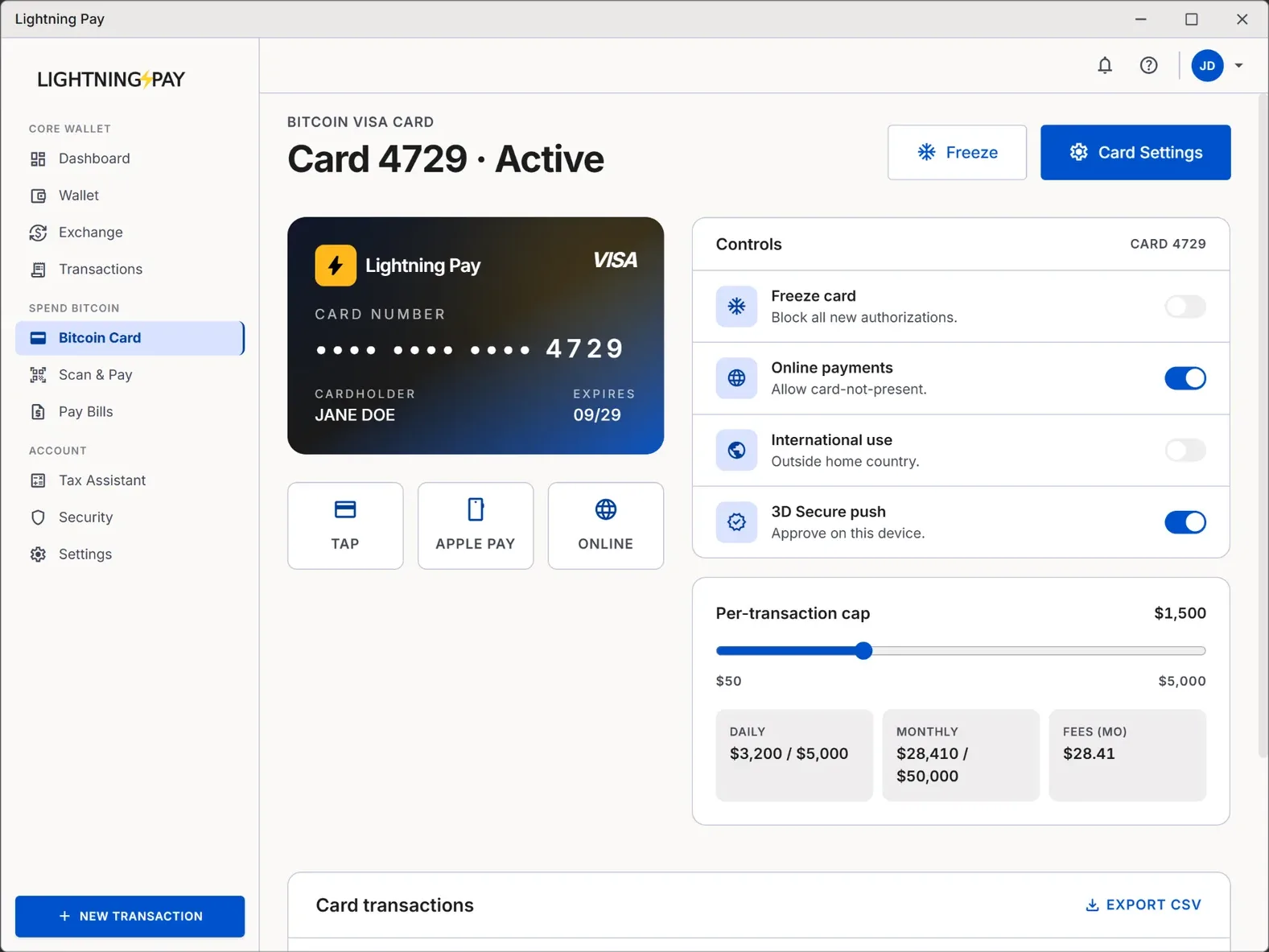
How the card works
Your bitcoin stays in your Lightning Pay wallet under your keys. When you pay with the card, we instantly swap the exact amount of sats needed to cover the purchase and authorise the transaction on the Visa network — usually in under 800 milliseconds, faster than most chip-and-PIN terminals can print a receipt.
No top-ups. No pre-funded fiat balance you have to babysit. The card pulls from your live BTC balance at the moment of the swipe, so you can spend bitcoin as easily as tapping a regular debit card.
Sub-second auth
No fiat float
Itemised receipts
Get the card in under 5 minutes
- 1
Install Lightning Pay Wallet
Free on macOS, Windows, and Linux. Create your non-custodial wallet and write down the 12-word seed phrase. - 2
Fund your wallet
Buy BTC in-app with Apple Pay, card, or bank transfer via MoonPay — or receive bitcoin from any exchange or wallet. - 3
Tap Cards → Order Visa
Instant virtual card provisions to Apple Pay or Google Pay; the physical card ships free in supported regions. - 4
Set limits & controls
Spending limits, freeze/unfreeze, geo-fencing, and merchant-category blocks — all before your first swipe.
Exact card fees — no hidden spread
Flat, published fee schedule
- Swap fee at POS
- 0.1%
- Network / settlement
- 0.5%
- FX markup
- 0%
- Monthly / annual / inactivity
- $0
- Virtual card issuance
- Free
- Physical card shipping
- Free in supported regions
- ATM withdrawal
- 0.5% network + ATM operator fee
| Card | Swap / spread | Monthly | FX markup |
|---|---|---|---|
| Lightning Pay | 0.1% | $0 | 0% |
| Crypto.com (mid tier) | ~1–2% | Stake $400+ CRO | Up to 3% |
| Coinbase Card | Hidden in spread | $0 | Up to 3% |
| BitPay | Spread + fee | $5 issuance | 3% |
Card limits and controls
Default limits suit everyday spending and tighten from the app in one tap. Raise them by completing optional KYC tiers through our card-issuer partner — your wallet stays non-custodial either way.
- Daily POS spend
- $10,000
- Daily ATM withdrawal
- $1,000
- Single transaction
- $5,000
- Monthly spend
- $50,000
- Freeze / unfreeze in one tap
- Per-merchant & category blocks
- Geo-fence to specific countries
- Custom per-transaction caps
Where you can use it
200+ countries
Tap, chip & online
Apple & Google Pay
The card auto-converts to the local currency at the Visa mid-market rate with zero FX markup. A coffee in Lisbon shows up as EUR, a hotel in Tokyo as JPY, a SaaS bill in USD — all funded from the same BTC balance, no separate currency pockets to top up.
Apple Pay, Google Pay, and online checkout
The virtual card provisions to Apple Pay and Google Pay instantly after issuance — tap "Add to Wallet" inside Lightning Pay and pay with bitcoin from your phone before the physical card arrives.
Single-use virtual numbers
Main card stays safe
Card security
- Freeze and unfreeze the card from the app in one tap.
- Per-transaction limits and merchant-category controls.
- Unlimited single-use virtual card numbers for online checkout.
- 3D Secure push notifications — approve or reject every online transaction from your phone.
- Your seed phrase never leaves the device. Lightning Pay cannot access, freeze, or seize your bitcoin.
- Lost or stolen? Freeze instantly and order a replacement — your BTC balance lives in your wallet, not on the card.
Taxes when you spend bitcoin
In most jurisdictions, spending bitcoin is a taxable disposal. Lightning Pay logs the cost basis and disposal value for every card transaction and exports a ready-to-file CSV through the in-app Tax Assistant.
Cost basis tracked
CSV exports
Tax Assistant
Bitcoin Card vs Crypto.com, Coinbase & Gemini cards
Most crypto cards today are custodial: you deposit coins into the provider's wallet, they issue a card, and you rely on their solvency. Lightning Pay is non-custodial — your keys, your sats, your bitcoin debit card. If Lightning Pay disappeared tomorrow, your BTC would still be recoverable from the seed phrase you wrote down on day one.
Lightning Pay
- Non-custodial — your seed, your sats
- Flat 0.1% swap + 0.5% network
- 0% FX, $0 monthly, no tiers
- No staking, no rewards-token lock-in
Custodial crypto cards
- Coins held by the provider
- Best rates often gated by staking
- Hidden spread on swaps
- Up to 3% FX on foreign purchases
Five ways people actually use the Lightning Pay card
The Bitcoin Visa card replaces a debit card for most everyday spending, but the people who get the most out of it tend to use it for one of these five patterns. Pick the one closest to you and the rest of the wallet falls into place.
- The everyday spender
- Tap the card at the coffee shop, grocery store, and online checkout. Sats convert at point of sale at 0.1%. No pre-loading, no fiat balance to top up.
- The freelancer
- Invoice clients in BTC or USDC, get paid in your non-custodial wallet, spend the proceeds with the card. No bank transfer step, no waiting on payouts.
- The traveller
- 0% FX markup at the Visa mid-market rate — meaningfully cheaper than most travel credit cards in most currencies. Apple Pay / Google Pay support means you can fly with no plastic.
- The privacy-minded
- Generate single-use virtual card numbers per merchant for online subscriptions. Burn them when you cancel. Stops merchants linking your purchases together.
- The DCA stacker
- Set Auto-DCA to buy a fixed BTC amount weekly from your bank. Spend with the card in between. Your BTC stack grows; your everyday balance flows through stablecoins or BTC at your choice.
Tax and accounting for a Bitcoin card
Spending Bitcoin is a taxable event in most jurisdictions, the same as selling it. Every card swipe creates a disposal at the BTC price at the moment of authorisation, and the difference against your cost basis is a capital gain or loss. This is true whether you use Lightning Pay, a custodial competitor, or convert manually on an exchange first.
Lightning Pay's built-in Tax Assistantdoes the bookkeeping automatically. Every card swipe is logged with the BTC amount, the fiat amount, the FX rate, the swap fee, the cost basis lot used (FIFO by default, with HIFO and specific-ID available), and the resulting gain or loss. Export to CSV for Koinly, CoinTracker, TurboTax, or directly to IRS Form 8949 for US filers. UK users get a CGT summary aligned to the same-day, 30-day, and pool rules.
Security: how the card stays safe even when your phone doesn't
The card is non-custodial in the sense that matters: your BTC stays in your wallet until the moment of authorisation. Lightning Pay swaps the exact sats needed at point of sale — we never hold a fiat balance for you, we never need to. If your phone is lost or stolen, your funds are protected by the same controls that protect any non-custodial wallet: biometric unlock on the device, PIN for spending, and the 12-word seed in your safe at home.
Card-specific controls are extensive. Freeze the card instantly from the app. Generate a new virtual card number with one tap. Set per-merchant spending limits. Lock the card to specific merchant categories (e.g. "groceries and transit only"). Enable geolocation-based fraud protection. Disable online use entirely if you only need the physical card. All controls live in the wallet, signed by your local keys — there's no support agent who can override them or who can issue a card on your behalf.
Frequently asked questions
Ready to own your Bitcoin?
Lightning Pay is free, open source, and non-custodial. Your keys never leave your device.